Friday, September 21, 2012

General limitations of MySQL


General limitations of MySQL


32-bit binaries cannot address more than 4 Gbyte of memory. This is not a MySQL limitation, this is a technical limitation.
BLOB's are limited to 1 Gbyte in size even thought you use LONGBLOB because of a limitation in the MySQL protocol: The protocol limit for max_allowed_packet is 1GB.


Limitations of MySQL 4.1

Limitations of Joins

In MySQL 4.1, the maximum number of tables that can be referenced in a single join is 61. This also applies to the number of tables that can be referenced in the definition of a view.

Limitations of the MyISAM storage engine

There is a limitation of 232 (~4.2 Mia) rows in a MyISAM table. You can increase this limitation if you build MySQL with the --with-big-tables option then the row limitation is increased to 264 (1.8 * 1019) rows.


Limitations of MySQL 5.0

Limitations of Joins

The maximum number of tables that can be referenced in a single join is 61. This also applies to the number of tables that can be referenced in the definition of a view. This also applies to LEFT and RIGHT OUTER JOINS.

Limitations of the MyISAM storage engine

Large files up to 63-bit file length are supported.
There is a limitation of 264 (1.8 * 1019) rows in a MyISAM table.
The maximum number of indexes per MyISAM table is 64. You can configure the build by invoking configure with the --with-max-indexes=N option, where N is the maximum number of indexes to permit per MyISAM table. N must be less than or equal to 128.
The maximum number of columns per index is 16.
The maximum key length is 1000 bytes. This can be changed by changing the source and recompiling.


Limitations of the InnoDB storage engine

A table cannot contain more than 1000 columns.
The internal maximum key length is 3500 bytes, but MySQL itself restricts this to 1024 bytes.
The maximum row length, except for VARCHAR, BLOB and TEXT columns, is slightly less than half of a database page. That is, the maximum row length is about 8000 bytes. LONGBLOB and LONGTEXT columns must be less than 4 Gbyte, and the total row length, including also BLOB and TEXT columns, must be less than 4 Gbyte.
Although InnoDB supports row sizes larger than 65535 internally, you cannot define a row containing VARCHAR columns with a combined size larger than 65535.
The maximum tablespace size is 4 Mia database pages (64 Tbyte). This is also the maximum size for a table.


Limitations of MySQL 5.1

Limitations of Joins

The maximum number of tables that can be referenced in a single join is 61. This also applies to the number of tables that can be referenced in the definition of a view.

Limitations of Partitions

The limitation of partitions with MySQL is 1024 (internal mail). But one have to increase open_files_limit. See also:


Limitations of MySQL Cluster

Max attributes/columns in an index: 32
Max number of attributes (columns and indexes) in a table: 128
Max number of table: 1792 (v5.0)
Max size in bytes of a row is 8052 byte, excluding blobs which are stored separately.
Max number of nodes in a cluster: 63, max. number of data nodes: 48 (in v5.0/5.1)
Max number of nodes in a cluster: 255 in CGE.
Max number of metadata objects: 20320.
Max attribute name length: 31 characters.
Max database + table name length: 122 characters.

Statement-based vs Row-based Replication

Statement-based vs Row-based Replication

Replication as most people know it, has mostly been SQL statement propagation from master to slave. This is known as “statement-based” replication. But there is also another kind of replication that is available, “the row-based replication” and that has quite a lot of benefits. In this post I intend on highlighting the advantages and disadvantages of both the types of replication to help you choose the best one. I also follow up with my own recommendation.
Let’s start off with discussing both the types.

Statement-based Replication

With statement-based replication, every SQL statement that could modify data is logged on the master. Then those SQL statements are replayed on the slaves against the same dataset and in the same context. The statement-based replication corresponds to the statement-based binary logging format.

Row-based Replication

With row-based replication, every “row modification” is logged on the master and is then applied on the slave. The keywords here are “row modification”, which implies that row-based replication is physical, in the sense that SQL statements that change the rows are not recorded, instead the entire updated row is written to the binary log. But there are a few exceptions, when a new table is created, dropped, or altered, the actual SQL statement is recorded. The row-based replication corresponds to row-based binary logging format.
Now that I have defined both the types of replication, let’s start having a look at the advantages and disadvantages of both the approaches.

Advantages of Statement-based Replication

Following are some of the advantages of statement-based replication. All of these advantages come down from the fact that the SQL statements are logged:
  • There is always less data that is to be transferred between the master and the slave.
  • There is less space taken up in the update logs.
  • There is no need to deal with the row format.
  • Also, auditing the database is easy, because statements that made any changes to the data are all logged in the binary log.

Disadvantages of Statement-based Replication

Following are some of the disadvantages of statement-based replication:
  • The single biggest disadvantage of statement-based replication is the data-inconsistency issue between the master and the slave that creeps up due to the way this kind of replication works. Because we are logging the SQL statements, it is also necessary to log context information, so that the updates produce the same results on the slave as they did originally on the master. But in some cases it is not possible to provide any such context. Any nondeterministic behavior, is not going to have any such context present and hence is difficult to replicate using statement-based replication.
    Let me quote an example here from the MySQL manual:
    “For example, for INSERT … SELECT with no ORDER BY, the SELECT may return rows in a different order (which results in a row having different ranks, hence getting a different number in the AUTO_INCREMENT column), depending on the choices made by the optimizers on the master and slave.”
  • With statement-based replication, you are bound to encounter issues with replicating stored routines or triggers, and hence this kind of replication does not always work with stored routines and triggers.
  • There is a performance penalty in the case of INSERT … SELECT, because in the case of statement-based replication this kind of statement requires a greater number of row-level locks as compared to row-based replication.
  • There is a lot of execution context information that is required in order for the updates to produce the same results on the slave as they did originally on the master.
  • A statement that depends on UDFs or stored routines that are nondeterministic, cannot be replicated properly, since the value returned by such a UDF or stored routine is not always the same, for similar parameters.

Advantages of Row-based Replication

Following are the major advantages of row-based replication:
  • With row-based replication, each and every change can be replicated and hence this is the safest form of replication.
  • Because every row update is physically logged, hence there no need for any context information. The only thing that is needed is to know which record is being updated and what is the update that is being written to that record.
  • There are fewer row locks required on the master, which thus achieves high concurrency.
  • The problems with auto_increment columns, timestamps, stored routines, and triggers don’t bother us with this kind of replication.
  • Statements that update very few rows are very fast.

Disadvantages of Row-based replication

Following are the disadvantages of row-based replication:
  • On a system that frequently updates large number of rows such as,
    UPDATE products set status='sold' where product_id BETWEEN 30000 and 50000;
    row-based replication produces very large update logs and generates a lot of network traffic between the master and the slave.
  • This kind of replication requires a lot of awareness of the internal row format.
  • In cases of very large updates, the performance overhead associated with the increased I/O required to write large update logs could become unacceptable.
  • You cannot examine the logs to audit changes to the database, because SQL statements are not logged, instead the data is logged in binary format.

Conclusion

Although both the types have advantages and disadvantages, but for me the advantage that row-based replication offers in terms of data consistency between master and slave, far outweighs any of the disadvantages. Though you might point out the fact that large updates produce large update logs in case of row-based replication, but those cases in real-world would be far and few and not very frequent. Also, stored routines and triggers are increasingly being used after their introduction in MySQL and row-based replication allows us to use them without thinking about them being unsafe for replication. Also everyone loves high-concurrency, don’t they and that is something that row-based replication achieves. And as far as auditing of data updates is concerned you could use “mysqlbinlog” to help you decode the binary logs and figure out the changes to data.
There are also other host of optimizations that are possible due to the way how this kind of replication works, which I will be discussing in a future post.
So my recommendation is go for row-based replication, you are going to love it!

Wednesday, August 29, 2012

MySQL Scalability Architecture

MySQL Scalability Practice


Agenda

Ø  Brief Introduction
Ø  High Availability and Scalability
Ø  MySQL Replication
Ø  MySQL Cluster
Ø  DRBD
Ø  Resources
MySQL Brief introduction
Ø  High performance
Ø  Reliable 
Ø  Easy To Use


High Availability

       7 * 24 * 365  online
       Single point of failure
       Auto Recover
Scalability
            Scalability refers to the ability to spread the load of your application queries across multiple MySQL servers.
Scalability - Scale up
       Scale vertically - add resources to a single node in a system, typically involving the addition of CPUs or memory to a single computer.
       Pros :
ü    Simple Maintenance
ü    Centralization Data, Simple application architecture
       Cons :
ü    Expensive Device
ü    Limitation of processing, Prone to bottleneck
ü    Single point of failure     
Scalability - Scale out
       Scale horizontal - add more nodes to a system, such as adding a new computer to a distributed software application.
       Pros :
ü    Bottleneck is not easy occur
ü    Low cost device.
ü    Little impact on single point of failure, HA
       Cons :
ü    More nodes, more complex
ü    Difficult to maintain

Scalability - Scale out
       Database Scale out How?
Scalability – Principle
       Principle 
Ø  Minimize  Transaction Relevance
Ø  Data Consistency, BASE model
Ø  HAData Security. Data Redundancy.
MySQL Replication
Features :
o   Across different platforms
o   Asynchronous
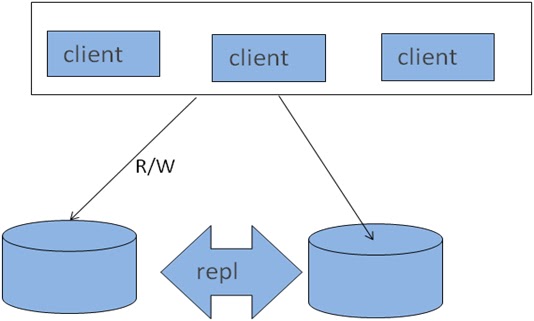
o   One master to any number of slaves.(separate R/W)
o   Data can only be written to the master
o   No guarantee that data on master and slaves will be consistent at a given point in time.
MySQL Replication – Process
Master
                       I/O thread
                       Binary Log (mysqld log-bin)
Slave  
                       I/O thread
                       SQL thread
                       Relay Log
                       Master-info

MySQL Replication – Level
Ø  Statement Level
Ø  Row Level (support from 5.1.5)
Ø  Mixed Level (support from 5.1.8,default)


MySQL Server Architecture


MySQL Replication – Architecture
      Master-slaves
MySQL Replication – Architecture


      Master – Master

MySQL Replication – Architecture
      Master-Slaves-Slaves
  
MySQL Replication - Architecture

MySQL Replication – Architecture
 MySQL Replication – Architecture
Sharding
Ø  Vertical Sharding
            according to function, different table locate on different DB
Ø  Horizontal Sharding
            data on same table locate on different DB
Ø  Mixed Sharding
      Pros and Cons
Application System How to integrate all of data source?
Ø  Each application system maintain its required data sources
Ø  Unified management by middle layer
o   Self-developed
o   MySQL Proxyconnection route, load balance, HA query filter query modify
o   Amoebabased on java
o   HiveDB 


Sharding Problems
Ø  Distribute transaction question
Ø  Join cross multi nodessupported by federated storage engine
Ø  Merge sort paging cross multi nodes


MySQL Cluster 
Ø  Real-time transactional relational
Ø     “Shared-nothing" distributed architecture
Ø      No single point of failure, two replicas is needed
Ø      Synchronous and two-phase commit
Ø      R/W on any nodes
Ø      Automatic failover between nodes
  
Shared-Nothing
MySQL Cluster
MySQL Cluster
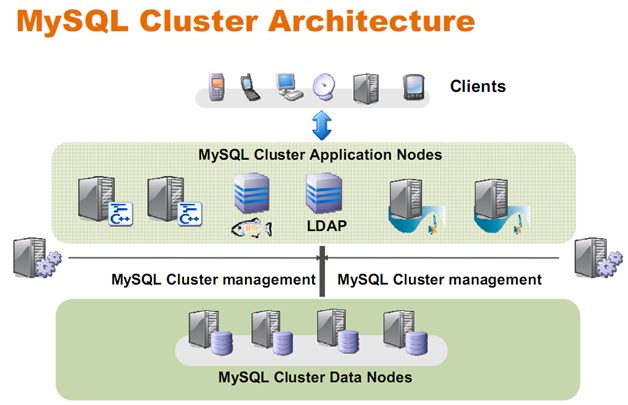
       Three parts:

Ø  Manage node
Ø  SQL node, startup with ndbcluster
Ø  NDB data node
           Data storage and management of both in-memory and disk-based data
            Automatic and user defined partitioning of data
            Synchronous replication of data between data nodes
            Transactions and data retrieval
            Automatic fail over
            Resynchronization after failure
MySQL Cluster
MySQL Cluster

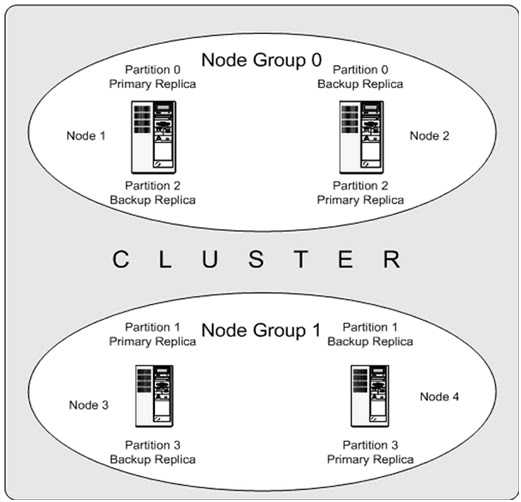
Ø  Cluster Nodes
Ø   Node Groups
[number_of_node_groups] = number_of_data_nodes / NumberOfReplicas
Ø  Replicas
The number of replicas is equal to the number of nodes per node group
Ø  Partitions
This is a portion of the data stored by the cluster
MySQL Cluster normally partitions NDBCLUSTER tables automatically Horizontal Data Partitioning. Based on hash algorithm based on the primary key on the table.

MySQL Cluster
MySQL cluster replication
Replicate asynchronously
DRBD (Distributed Replicated Block Device) 
DRDB is a solution from Linbit supported only on Linux. DRBD creates a virtual block device (which is associated with an underlying physical block device) that can be replicated from the primary server to a secondary server. 
MySQL HA
Resources
Ø  HA: Heartbeat
Ø  Load balance : F5/NetScalar/LVS/HAProxy
Ø  Monitor : Nagios/cacti

Tuesday, August 28, 2012

Script to copy files from one host to a group of hosts

#/usr/bin/sh
# This is a script to copy files from one host to a group of hosts

# There are three variables accepted via commandline
# $1 = first parameter (/source_path/source_filename)
# $2 = second parameter (/target_directory/)
# $3 = third paramter (file that contains list of hosts)

SOURCEFILE=$1
TARGETDIR=$2
HOSTFILE=$3

if [ -f $SOURCEFILE ]
then
   printf "File found, preparing to transfer\n"
   while read server
   do
      scp -p $SOURCEFILE ${server}:$TARGETDIR
   done < $HOSTFILE
else
   printf "File \"$SOURCEFILE\" not found\n"
   exit 0
fi
exit 0

Sample starter my.cnf for different systems

32 bit system
2GB of memory
Dedicated DB Box
All innodb tables
32 bit system
4GB of memory
Dedicated DB Box
All Innodb tables
[mysqld]
user = mysql
pid-file = /var/run/mysqld/mysqld.pid
socket = /var/run/mysqld/mysqld.sock
port = 3306
basedir = /mysql/
datadir = /data01/data
tmpdir = /tmp
thread_cache_size = 64
table_cache = 64
key_buffer = 64M
sort_buffer_size = 256K
read_buffer_size = 256K
read_rnd_buffer_size = 256K
max_allowed_packet = 1M
tmp_table_size=16M
max_heap_table_size=16M
query_cache_size=64M
query_cache_type=1
log_output=FILE
slow_query_log_file=/mysql/slow1.log
slow_query_log=1
long_query_time=3
log-error=/mysql/error.log
innodb_data_home_dir = /data01/data
innodb_data_file_path = ibdata1:1000M:autoextend
innodb_buffer_pool_size = 768M
innodb_additional_mem_pool_size = 8M
innodb_flush_log_at_trx_commit = 1
innodb_support_xa = 0
innodb_lock_wait_timeout = 50
innodb_flush_method=O_DIRECT
innodb_log_files_in_group = 2
innodb_log_file_size = 64M
innodb_log_buffer_size = 8M
innodb_thread_concurrency = 8
[mysqld]
user = mysql
pid-file = /var/run/mysqld/mysqld.pid
socket = /var/run/mysqld/mysqld.sock
port = 3306
basedir = /mysql/
datadir = /data01/data
tmpdir = /tmp
thread_cache_size = 64
table_cache = 64
key_buffer = 64M
sort_buffer_size = 256K
read_buffer_size = 256K
read_rnd_buffer_size = 256K
max_allowed_packet = 1M
tmp_table_size=16M
max_heap_table_size=16M
query_cache_size=64M
query_cache_type=1
log_output=FILE
slow_query_log_file=/mysql/slow1.log
slow_query_log=1
long_query_time=3
log-error=/mysql/error.log
innodb_data_home_dir = /data01/data
innodb_data_file_path = ibdata1:1000M:autoextend
innodb_buffer_pool_size =2048M
innodb_additional_mem_pool_size = 8M
innodb_flush_log_at_trx_commit = 1
innodb_support_xa = 0
innodb_lock_wait_timeout = 50
innodb_flush_method=O_DIRECT
innodb_log_files_in_group = 2
innodb_log_file_size = 128M
innodb_log_buffer_size = 8M
innodb_thread_concurrency = 8
32 bit system
8GB+ of memory
Dedicated DB Box
All Innodb tables
64 bit system
8GB of memory
Dedicated DB Box
All innodb tables
******  Go download a 64Bit OS.  ****** [mysqld]
user = mysql
pid-file = /var/run/mysqld/mysqld.pid
socket = /var/run/mysqld/mysqld.sock
port = 3306
basedir = /mysql/
datadir = /data01/data
tmpdir = /tmp
thread_cache_size = 128
table_cache = 256
key_buffer = 64M
sort_buffer_size = 256K
read_buffer_size = 256K
read_rnd_buffer_size = 256K
max_allowed_packet = 1M
tmp_table_size=32M
max_heap_table_size=32M
query_cache_size=128M
query_cache_type=1
log_output=FILE
slow_query_log_file=/mysql/slow1.log
slow_query_log=1
long_query_time=2
log-error=/mysql/error.log
innodb_data_home_dir = /data01/data
innodb_data_file_path = ibdata1:1000M:autoextend
innodb_buffer_pool_size = 5120M
innodb_additional_mem_pool_size = 8M
innodb_flush_log_at_trx_commit = 1
innodb_support_xa = 0
innodb_lock_wait_timeout = 50
innodb_flush_method=O_DIRECT
innodb_log_files_in_group = 2
innodb_log_file_size = 64M
innodb_log_buffer_size = 8M
innodb_thread_concurrency = 8
64 bit system
16GB of memory
Dedicated DB Box
All Innodb tables
64 bit system
32GB of memory
Dedicated DB Box
All Innodb tables
[mysqld]
user = mysql
pid-file = /var/run/mysqld/mysqld.pid
socket = /var/run/mysqld/mysqld.sock
port = 3306
basedir = /mysql/
datadir = /data01/data
tmpdir = /tmp
thread_cache_size = 128
table_cache = 512
key_buffer = 64M
sort_buffer_size = 256K
read_buffer_size = 256K
read_rnd_buffer_size = 256K
max_allowed_packet = 1M
tmp_table_size=32M
max_heap_table_size=32M
query_cache_size=128M
query_cache_type=1
log_output=FILE
slow_query_log_file=/mysql/slow1.log
slow_query_log=1
long_query_time=2
log-error=/mysql/error.log
innodb_data_home_dir = /data01/data
innodb_data_file_path = ibdata1:1000M:autoextend
innodb_buffer_pool_size = 12288M
innodb_additional_mem_pool_size = 8M
innodb_flush_log_at_trx_commit = 1
innodb_support_xa = 0
innodb_lock_wait_timeout = 50
innodb_flush_method=O_DIRECT
innodb_log_files_in_group = 2
innodb_log_file_size = 128M
innodb_log_buffer_size = 8M
innodb_thread_concurrency = 12
[mysqld]
user = mysql
pid-file = /var/run/mysqld/mysqld.pid
socket = /var/run/mysqld/mysqld.sock
port = 3306
basedir = /mysql/
datadir = /data01/data
tmpdir = /tmp
thread_cache_size = 256
table_cache = 1024
key_buffer = 64M
sort_buffer_size = 256K
read_buffer_size = 256K
read_rnd_buffer_size = 256K
max_allowed_packet = 1M
tmp_table_size=32M
max_heap_table_size=32M
query_cache_size=128M
query_cache_type=1
log_output=FILE
slow_query_log_file=/mysql/slow1.log
slow_query_log=1
long_query_time=2
log-error=/mysql/error.log
innodb_data_home_dir = /data01/data
innodb_data_file_path = ibdata1:1000M:autoextend
innodb_buffer_pool_size =24676M
innodb_additional_mem_pool_size = 8M
innodb_flush_log_at_trx_commit = 1
innodb_support_xa = 0
innodb_lock_wait_timeout = 50
innodb_flush_method=O_DIRECT
innodb_log_files_in_group = 2
innodb_log_file_size = 128M
innodb_log_buffer_size = 8M
innodb_thread_concurrency = 16
NOTE: If you change you log file size, you will get errors unless you move the old ones and allow innodb to recreate them ( do it with the DB down by the way )… once again I offer no warranty.

You may also want to turn of swappiness to avoid swapping

Also of consideration to add is:

innodb_file_per_table
innodb_flush_method=O_DIRECT
 

Insight into doing large backup with mysqldump

INSIGHT INTO DOING BACKUPS WITH mysqldump

IMHO Doing backups has become more of an art form if you know just how to approach it
You have options

Option 1 : mysqldump an entire mysql instance
This is the easiest one, the no-brainer !!!
mysqldump -h... -u... -p... --routines --triggers --all-databases | gzip > MySQLData.sql.gz
Everything written in one file: table structures, indexes, triggers, stored procedures, users, encrypted passwords. Other mysqldump options can also export different styles of INSERT commands, log file and position coordinates from binary logs, database creation options, partial data (--where option), and so forth.

Option 2 : mysqldump separate databases into separate data files
Start by creating a list of databases (2 techniques to do this)
Technique 1
mysql -h... -u... -p... -A --skip-column-names -e"SELECT schema_name FROM information_schema.schemata WHERE schema_name NOT IN ('information_schema','mysql')" > ListOfDatabases.txt
Technique 2
mysql -h... -u... -p... -A --skip-column-names -e"SELECT DISTINCT table_schema FROM information_schema.tables WHERE table_schema NOT IN ('information_schema','mysql')" > ListOfDatabases.txt
Technique 1 is the fastest way. Technique 2 is the surest and safest. Technique 2 is better because, sometimes, users create folders for general purposes in /var/lib/mysql (datadir) which are not database related. The information_schema would register the folder as a database in the information_schema.schemata table. Technique 2 would bypass folders that do not contain mysql data.
Once you compile the list of databases, you can proceed to loop through the list and mysqldump them, even in parallel if so desired.
for DB in `cat ListOfDatabases.txt`
do
    mysqldump -h... -u... -p... --routines --triggers ${DB} | gzip > ${DB}.sql.gz &
done
wait
If there are too many databases to launch at one time, parallel dump them 10 at a time:
COMMIT_COUNT=0
COMMIT_LIMIT=10
for DB in `cat ListOfDatabases.txt`
do
    mysqldump -h... -u... -p... --routines --triggers ${DB} | gzip > ${DB}.sql.gz &
    (( COMMIT_COUNT++ ))
    if [ ${COMMIT_COUNT} -eq ${COMMIT_LIMIT} ]
    then
        COMMIT_COUNT=0
        wait
    fi
done
if [ ${COMMIT_COUNT} -gt 0 ]
then
    wait
fi
Option 3 : mysqldump separate tables into separate data files
Start by creating a list of tables
mysql -h... -u... -p... -A --skip-column-names -e"SELECT CONCAT(table_schema,'.',table_name) FROM information_schema.tables WHERE table_schema NOT IN ('information_schema','mysql')" > ListOfTables.txt
Then dump all tables in groups of 10
COMMIT_COUNT=0
COMMIT_LIMIT=10
for DBTB in `cat ListOfTables.txt`
do
    DB=`echo ${DBTB} | sed 's/\./ /g' | awk '{print $1}'`
    TB=`echo ${DBTB} | sed 's/\./ /g' | awk '{print $2}'`
    mysqldump -h... -u... -p... --triggers ${DB} ${TB} | gzip > ${DB}_${TB}.sql.gz &
    (( COMMIT_COUNT++ ))
    if [ ${COMMIT_COUNT} -eq ${COMMIT_LIMIT} ]
    then
        COMMIT_COUNT=0
        wait
    fi
done
if [ ${COMMIT_COUNT} -gt 0 ]
then
    wait
fi
Option 4 : USE YOUR IMAGINATION
Try variations of the aforementioned Options plus techniques for clean snapshots
Examples
  1. Order the list of tables by the size of each tables ascending or descending.
  2. Using separate process, run "FLUSH TABLES WITH READ LOCK; SELECT SLEEP(86400)" before launching mysqldumps. Kill this process after mysqldumps are complete.
  3. Save the mysqldumps in dated folders and rotate out old backup folders.
  4. Load whole instance mysqldumps into standalone servers.
CAVEAT
Only Option 1 brings everything. The drawback is that mysqldumps created this way can only be reloaded into the same majot release version of mysql that the mysqldump was generated. In other words, a mysqldump from a MySQL 5.0 database cannot be loaded in 5.1 or 5.5. The reason ? The mysql schema is total different among major releases.
Options 2 and 3 do not include saving usernames and passwords.
Here is the generic way to dump the SQL Grants for users that is readble and more portable
mysql -h... -u... -p... --skip-column-names -A -e"SELECT CONCAT('SHOW GRANTS FOR ''',user,'''@''',host,''';') FROM mysql.user WHERE user<>''" | mysql -h... -u... -p... --skip-column-names -A | sed 's/$/;/g' > MySQLGrants.sql
Option 3 does not save the stored procedures, so you can do the following
mysqldump -h... -u... -p... --no-data --no-create-info --routines > MySQLStoredProcedures.sql &
Another point that should be noted is concerning InnoDB. If your have a large InnoDB buffer pool, it makes sense to flush it as best you can before performing any backups. Otherwise, MySQL spends the time flushing tables with leftover dirty page out of the buffer pool. Here is what I suggest:
ABout 1 hour before performing the backup run this SQL command
SET GLOBAL innodb_max_dirty_pages_pct = 0;
In MySQL 5.5 default innodb_max_dirty_pages_pct is 75. In MySQL 5.1 and back, default innodb_max_dirty_pages_pct is 90. By setting innodb_max_dirty_pages_pct to 0, this will hasten the flushing of dirty pages to disk. This will prevent or at least lessen the impact of cleaning up any incomplete two-phase commits of InnoDB data prior to performing any mysqldump against any InnoDB tables.
FINAL WORD ON mysqldump
Most people shy away from mysqldump in favor of other tools and those tools are indeed good.
Such tools include
  1. MAATKIT (parallel dump/restore scripts, from Percona [Deprecated but great])
  2. XtraBackup (TopNotch Snapshot Backup from Percona)
  3. CDP R1Soft (MySQL Module Option that takes point-in-time snapshots)
  4. MySQL Enterprise Backup (formerly InnoDB Hot Backups [commercial])
If you have the spirit of a true MySQL DBA, you can embrace mysqldump and have the complete mastery over it that can be attained. May all your backups be a reflection of your skills as a MySQL DBA.

Import Big InnoDB Tables

Import Big InnoDB Tables

  1. turn off the logs;
  2. turn off unique key check if the table has;
  3. turn off foreign key check;
  • When importing data into InnoDB, make sure that MySQL does not have autocommit mode enabled because that requires a log flush to disk for every insert. To disable autocommit during your import operation, surround it with SET autocommit and COMMIT statements:  
  • SET autocommit=0; 
  • ... SQL import statements ... 
  • COMMIT; 
  • If you use the mysqldump option --opt, you get dump files that are fast to import into an InnoDB table, even without wrapping them with the SET autocommit and COMMIT statements. 
  • If you have UNIQUE constraints on secondary keys, starting from MySQL 3.23.52 and 4.0.3, you can speed up table imports by temporarily turning off the uniqueness checks during the import session: 
  • SET unique_checks=0; 
  • ... SQL import statements ... 
  • SET unique_checks=1; 
  • For big tables, this saves a lot of disk I/O because InnoDB can use its insert buffer to write secondary index records in a batch. Be certain that the data contains no duplicate keys.
  • # If you have FOREIGN KEY constraints in your tables, starting from MySQL 3.23.52 and 4.0.3, you can speed up table imports by turning the foreign key checks off for a while in the import session:  
  • SET foreign_key_checks=0; 
  • ... SQL import statements ... 
  • SET foreign_key_checks=1; 
  • For big tables, this can save a lot of disk I/O. 
  •  
  • If the above solution still can not quick your import process. Try mysqlimport. You can use mysqldump to dump a sql file and a text file. There is an example, look like this: